

Creating a STEMazing Studio
June 8, 2026
Where does Lava come from?
June 8, 2026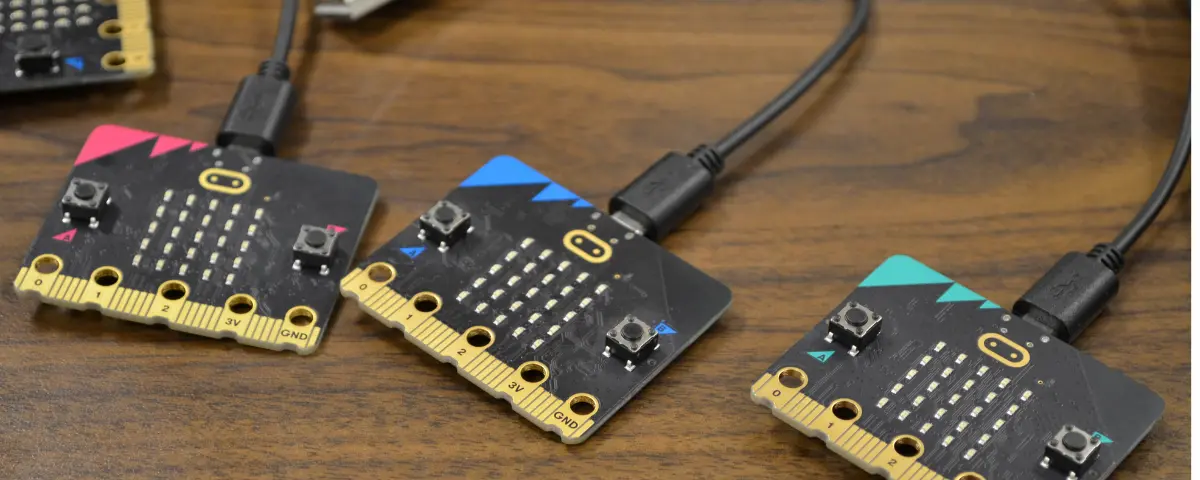
Coding can feel like learning a different language. It’s easy to get lost in all the jargon and feel overwhelmed by the idea of introducing coding to young learners. No matter how much experience you have, micro:bits are easy to understand and make teaching coding simple and engaging.
What are micro:bits?
A micro:bit is a small, codable computer. Even though they are just the size of your hand, they can perform a wide variety of tasks. The micro:bit V2 features a microphone, a speaker, and multiple LEDs. Students code on their computer or tablet, then plug in the micro:bit using a USB cable to download the code onto the micro:bit. These micro:bits are just the start. Our ELECFREAKS kits allow students to combine coding with other subjects like health science, agriculture, and robotics. micro:bits are also very durable, so you don’t have to worry about young learners accidentally breaking the tech.
Bring STEM Into the Classroom Without the Stress
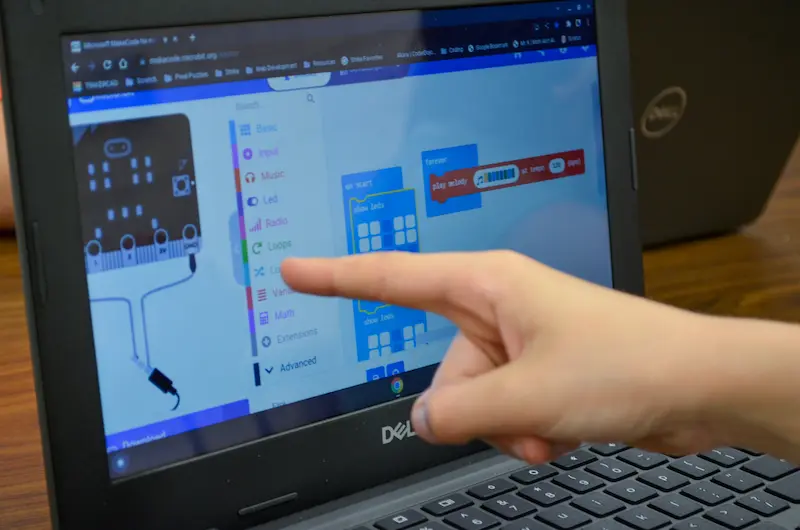
To get started using micro:bits in your classroom, create your class on micro:bit’s website. The login process is simple for you and for your students. Students can access your classroom through a link that connects to your Google Classroom or Clever. Students can code directly from the website and download their code onto the micro:bit using a USB cord. If you have iPads or tablets in your classroom, micro:bit has an app that students can connect to and use Bluetooth to download the code on the micro:bit. On the classroom website, you can view your students’ screens and even lock their screens while you’re giving instructions.
Classroom Ideas Across Subjects
micro:bits are versatile, and many of their simple functions can be brought into lessons about other subjects. For example, micro:bits have sensors that can measure temperature, which could fit into a science lesson. They can also act like dice, generating a random number between 1 and 6. Students can even code a Magic 8 Ball function, where shaking the micro:bit produces a different answer to their question. Through working with micro:bits, students can learn math by calculating probability. They can improve their reading skills since they need to read and understand code. micro:bits can record and play sound, which can easily fit into a music class or lesson. Micro:bits are also a great way to keep your students busy during an indoor recess or free time at the end of the year.
Why micro:bits Work for Every Grade Level
micro:bits start simple, but they can also challenge older students. Students can code micro:bits using block code and then advance to script coding, like Python and C++, as they get older. The accompanying kits can also challenge your older students to solve more difficult problems and innovate solutions. This flexibility means that your district can save money and use micro:bits across multiple grade levels. Since micro:bits are so small, storage isn’t a problem in your classroom, and they can easily move around for other teachers to use.
Classroom Management Tips for Success
Bringing any new STEM technology into the classroom is exciting for students, but sometimes that excitement can lead to chaos. Build lessons that require your students to understand the basics of coding before they touch a micro:bit. Over time, they can explore more features of the micro:bit and can advance to coding kits with more real-world applications. If you have some students who are quick learners, you can encourage them to help other students who may be struggling to lighten your load. Ultimately, the key to coding success is to encourage your students to explore, experiment, and learn from their mistakes.
What Students Learn Beyond Coding
Computer science is foundational in many industries, and more and more states are developing computer science standards to prepare students for the future. While coding is an important skill for students to have, students also gain many soft skills that can help them in the future. Working with micro:bits, students learn problem-solving and critical thinking skills while learning to code. Build your projects around collaboration, encouraging your students to brainstorm and work together to solve problems. Your students will gain confidence working with technology and will feel comfortable overcoming challenges.
One Device With Endless Possibilities
The best STEM tools are the ones teachers feel confident using, and students are excited to explore. The micro:bit checks both boxes. No matter what grade you teach, micro:bits create opportunities for students to think critically, solve problems, and bring their ideas to life. As your students experiment, create, and learn through hands-on activities, their confidence will grow, allowing them to turn curiosity into innovation.
STEM Education Works is dedicated to providing cost-effective and user-friendly access to top-notch STEM curricula and technologies, driven by our mission to transform students’ lives. Learn more about what we do through our socials, Facebook, Twitter, Youtube, LinkedIn, Instagram, and TikTok.