
Putting the T in STEM: Interview with Naomi Meredith
June 15, 2022
STEM as the Foundation of Construction: Interview with Daphene Koch
July 13, 2022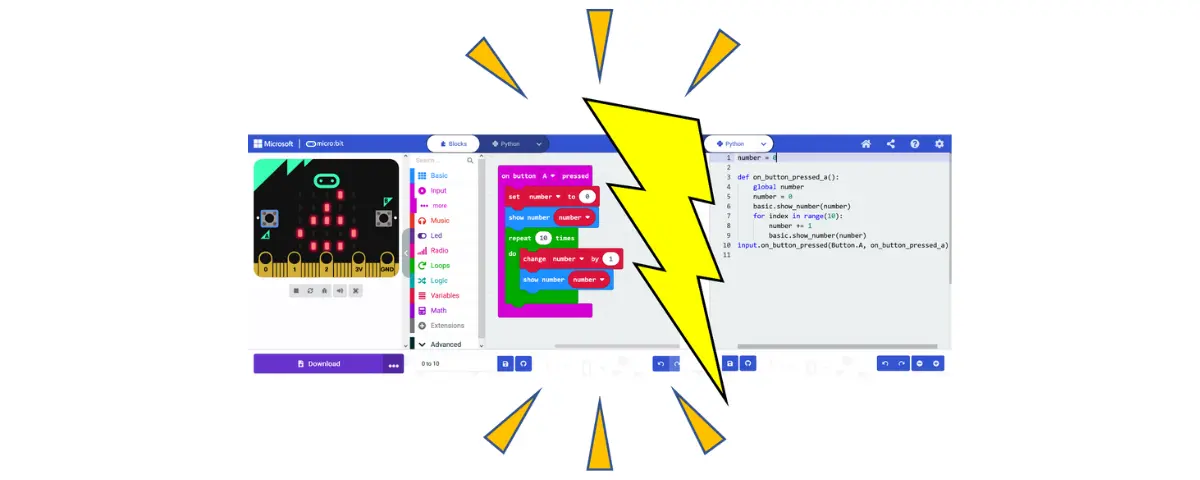
Many of our readers are familiar with the world of computer programming, at least to some degree. You’ve probably heard of text-based programming languages like C, C++, Python, JavaScript, or HTML, too. These are dynamic, powerful tools in education and computer science, but jumping headfirst into these common programming languages can be exceptionally challenging for students and teachers alike.
Syntax
The biggest barrier to learning a programming language? Syntax. The word “syntax” refers to the symbols, words, and rules that define the structure of a programming language, functioning much like the words and grammar behind a spoken language like English. Parentheses, brackets, colons, semicolons, and keywords like “if,” “for,” “while,” and “print” are all examples of syntax commonly used in programming languages. Developing an intuition for when and how to use coding syntax can often be just as challenging as learning a new spoken language like Spanish or Chinese.
Block Coding
Luckily, to help you and your students master text-based coding, we have block-based coding on hand. Block coding is a simple, intuitive form of coding with:
- a de-emphasis on syntax
- an emphasis on visual learning
- an easy learning curve
As the name suggests, block coding uses stackable blocks as its basic units of coding. Each block has a particular color, shape, and name, but these characteristics aren’t merely aesthetic. Instead, they are meant to convey what each block does and how it can, or cannot, be used in conjunction with other blocks. This more intuitive, less intensive approach to coding is a fantastic way to let your students “walk before they run,” learning the basics of computer programming and computational thinking along the way.
If you’re looking to introduce your students to the world of computer programming with the help of block coding, the micro:bit microcontroller and the Dobot robotic arm are great places to start. These technologies feature clear, easy-to-use block-based (and text-based) coding interfaces. They also provide a hands-on experience that helps your students bridge the gap between the abstract world of coding and the physical world of interactive technology, with the immediate feedback it provides in the classroom.
Making the Switch to Text-Based Coding
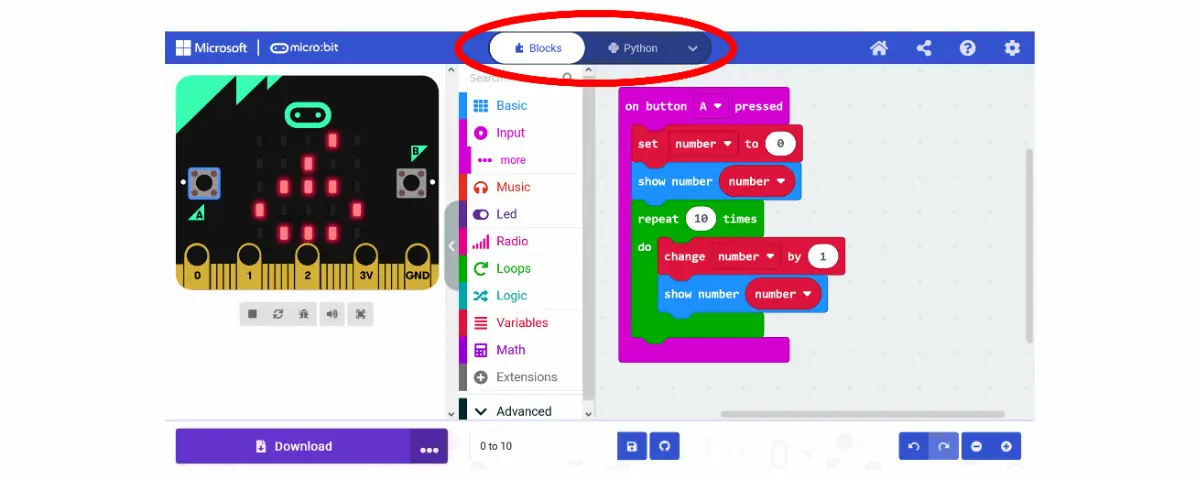
Now, while block coding is certainly colorful, engaging, and fun, it’s not meant to be the endgame when it comes to teaching your students about the subject of computer programming. Instead, block coding is meant to serve as a stepping stone toward text-based coding. With this essential factor in mind, I’d like to introduce you to one of my all-time favorite features in MakeCode, the online coding application for the micro:bit.
You’ll notice at the top of the application, there are two buttons: “Blocks” and “Python.” These buttons not only allow you to switch between using block coding and text-based coding to program your micro:bit, but they also allow your students to translate their block code into either Python or JavaScript text-based code (or vice versa)! Students can:
- Start by writing a block coding program that is easy for them to understand.
- Translate their block code into text-based code.
- Gain an understanding of Python and/or JavaScript syntax by drawing comparisons between their intuitive block code and their new text-based code.
This is something that I really wish I had at my disposal when I was a young student just starting on my coding journey!
Happy coding,
– Dr. Jake Roark
STEM Education Works provides educators and youth advocates with the hands-on tools, curriculum, and training to bring STEM learning to life. From coding and robotics to 3D printing and laser cutting, their solutions spark curiosity, build real-world skills, and prepare students for the future. Learn more about what we do through our socials, Facebook, Twitter, YouTube, LinkedIn, Instagram, and TikTok.