
Code, Bake, Run: From Recipe to Reality
June 8, 2026
Block Party: Exploring the World of Block Coding
June 8, 2026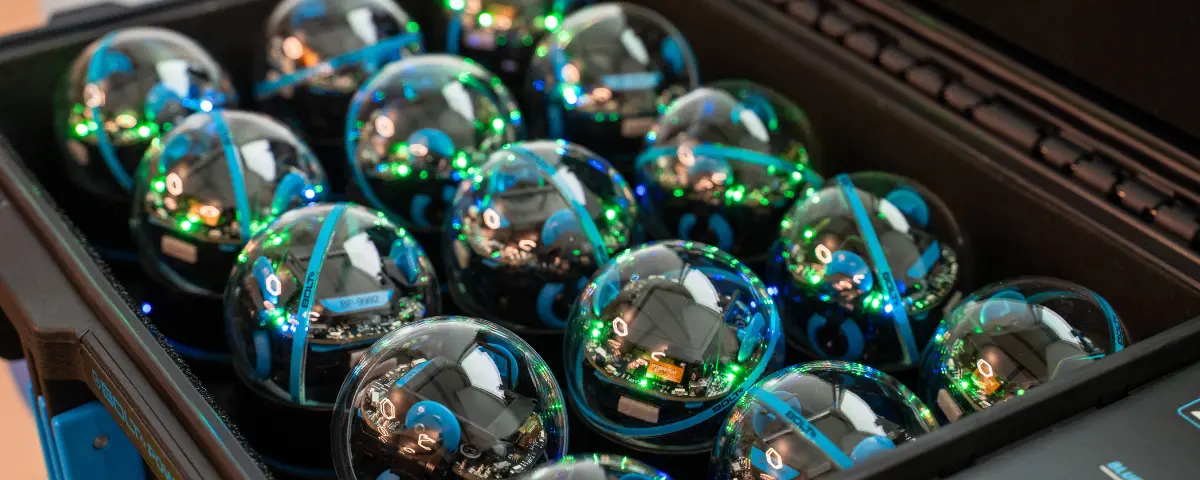
Getting students interested in coding can seem difficult and complex. BOLT+ simplifies the process and gets your students excited to program. This little robot supports hands-on STEM learning, builds coding skills, and brings computer science to life! BOLT+ has new features like an LCD screen that displays text, sensor data, and battery charge. The robot easily connects to SpheroEdu, available as both an app and a web page, where students can program and complete lessons.
What is BOLT+?
BOLT+ is the newest round robot on the block. This upgraded version allows students to start simply by drawing where they want the robot to go. From there, students can use block coding, and then, older, more experienced students can use JavaScript to program the robot. By starting simple, students learn without getting overwhelmed.
BOLT+ also features an LCD screen that brings the robot to life. By just touching the screen, students can manually drive the robot, which can be incorporated into lessons alongside programming movement. The screen can also display data from the robot’s advanced sensors. The infrared sensors allow the robots to communicate with each other. Ambient light sensors allow the robots to sense how much light is in the room. Finally, the inertial measurement unit (IMU) allows the robot to understand where it is in space. These sensors allow students to explore real-time data collection and responsive problem-solving.
Teaching Programming with Sphero
Starting with draw coding, students can advance their programming skills using the same robot. By simply drawing a path for the robot on the app, students can start programming and seeing their work play out in real time. Even if your students are just drawing a simple path for the robot, the instructions are coded in JavaScript, so students can start thinking about the code that actually programs the robot.
With block coding, students can drag and drop blocks of code and combine them to complete tasks. This is a great way for students to get started coding loops and conditionals without worrying about syntax errors. Although it sounds simplistic, block coding can get increasingly complex, as each block has more detailed instructions.
For more advanced students, BOLT+ can be programmed using JavaScript or Python. Students develop real-world programming and debugging skills. If you or your students get stuck, you can always reference the Sphero Wiki for help when programming with JavaScript or Python.
Getting Started in the Classroom
To get started bringing programming into your classroom, you can set up your classroom with a class code or by syncing with Google Classroom. Using a class code, your students won’t have to log in using a username or password. Google Classroom requires students to sync their Google account to SpheroEdu.
From there, you can find lessons in Sphero Central, the teacher-facing side of the program. You can filter based on topic and grade level before assigning it to your classroom. Students work on lessons using SpheroEdu. This is also where students can connect to the specific robot they are using. By just shaking the robot awake, it will automatically connect to the nearest Sphero Edu platform. Students can access SpheroEdu and start programming using the app or a web browser.
Advancing STEM Learning with BOLT+

With BOLT+, students can start with simple actions and build toward advanced programming without switching robots. They can easily navigate programming using the SpheroEdu app, and educators can control every step by managing the classroom and exploring lessons on Sphero Central. In the classroom, students can learn how code controls movement and how sensors provide data. They stay motivated and engaged because they see immediate results. BOLT+ supports learners at all levels and helps build a clear path into computer science. Learn how you can add Sphero Bolt+ to any STEM lab installation. Find out how to build a lab that fits your students’ needs.
STEM Education Works is dedicated to providing cost-effective and user-friendly access to top-notch STEM curricula and technologies, driven by our mission to transform students’ lives. Learn more about what we do through our socials, Facebook, Twitter, Youtube, LinkedIn, Instagram, and TikTok.